

If your Macfox X1S display shows an error code, do not keep riding and hope it clears by itself. The code is a warning from the display, controller, battery, brake, throttle, sensor, or motor circuit. Start with the safe checks: stop in a safe place, power the bike off, inspect visible connectors, check battery charge, and note exactly when the code appears.
This guide is for Macfox X1S display error codes and first-step troubleshooting. It is not a full controller repair manual. If the code comes with a hot smell, visible wire damage, brake cutout problem, motor grinding, repeated power loss, or a bike that accelerates unexpectedly, stop riding and contact Macfox support or a qualified e-bike technician.
Quick Answer: What to Do First
For most X1S error codes, the first move is the same: turn the bike off, remove load from the system, check the battery is seated and charged, then inspect only the external plugs and cable paths you can see without opening sealed parts. A Macfox X1S is an electric bike, so battery, display, controller, brake, throttle, and motor wiring all need to communicate cleanly before the bike can assist normally.

| Situation | Common Signs | Best Next Step |
|---|---|---|
| Stop riding now | Hot smell, smoke, damaged wire, brake not cutting power, throttle stuck, motor grinding, wheel wobble, or repeated cutout. | Do not reset repeatedly. Power off and get support before more riding. |
| Do a basic check | Low battery, code after storage, code after bump, code after washing, or code after reconnecting a part. | Charge fully, reseat visible connectors, dry the bike, and test at low speed only. |
| Use a support page | Blank display, E30 communication issue, controller reset question, throttle-only symptom, or Hall sensor question. | Follow the matching Macfox guide linked below instead of replacing parts by guesswork. |
Macfox X1S Error Code Table
Error-code wording can vary by display or controller version. Use this table as a practical first check, then follow the current Macfox support instruction for your specific bike if the code remains.
| Code | What It Usually Means | Likely Area | Safe First Check |
|---|---|---|---|
| E001 | Display is not receiving controller data. | Loose display/controller connection or damaged communication wire. | Power off, reseat visible connectors, check for bent pins or crushed cable. |
| E002 | Controller is not receiving display data. | Display plug, controller plug, or communication path issue. | Check connector alignment, then restart the bike once after reseating. |
| E003 | Controller malfunction. | Controller fault, overheating, water exposure, or internal issue. | Let the system cool. If it returns, use the controller failure guide or contact support. |
| E004 | Motor Hall sensor failure. | Loose sensor connection, damaged motor cable, or Hall signal issue. | Check the motor cable path. Read the Hall sensor guide if the symptom points to motor timing. |
| E005 | Motor phase missing. | Damaged motor phase wire or motor/controller connection problem. | Stop riding if the motor stutters, grinds, or loses power. |
| E006 | Throttle issue. | Throttle wiring, calibration, stuck throttle, or damaged throttle. | Check that the throttle returns freely. For throttle-only symptoms, use the throttle troubleshooting guide. |
| E007 | Brake lever malfunction. | Brake sensor or brake-cutoff wire issue. | Do not ride if brake cutoff behavior is unreliable. |
| E008 | Assist sensor error. | Assist sensor misalignment, dirt, or sensor wiring issue. | Inspect visible sensor area and cable path before further riding. |
| E009 / E06 | Low voltage or battery undervoltage. | Battery is low, not seated, too cold, aging, or unable to hold voltage under load. | Charge fully, reseat the battery, and test gently. Repeated undervoltage needs battery/support review. |
| E10 / E11 | Communication receive or send failure. | Display, controller, wire, or connector communication issue. | Power off, reseat accessible connectors, then restart once. |
| E30 | Communication error. | Display, controller, or wiring communication failure. | Use the Macfox E30 quick-fix guide before replacing parts. |
| E33 | Current abnormality. | Controller/motor load, wiring fault, or abnormal current detection. | Stop if the bike cuts out, smells hot, or feels weak under assist. |
| E08 / E34 | Throttle malfunction. | Throttle signal problem or damaged throttle part. | Do not ride if throttle response is unpredictable. |
| E36 / E35 / E07 | Motor phase missing or motor wiring issue. | Motor phase wire, connector, controller, or motor-side fault. | Stop hard testing. Check external wiring and contact support if the code remains. |
| E37 | Brake issue. | Brake lever sensor or wiring problem. | Confirm the brake lever moves freely and the cable is not damaged. |
Before You Reset Anything
A reset can clear a temporary display glitch, but it should not be used to hide a real electrical or brake problem. If the X1S shows a code after a crash, heavy rain, cable pull, wheel work, controller replacement, throttle issue, or repeated low-battery cutout, inspect the cause first.
Use Macfox's e-bike controller reset guide when the question is how to restart the controller or understand display parameters. Keep that separate from this page: changing P settings is not the same as fixing a fault code.
How to Troubleshoot an X1S Code Safely
1. Record the exact code and condition
Write down the code, battery level, assist level, and what the bike was doing when the code appeared. Note whether it happens at startup, during throttle use, under pedal assist, while braking, after charging, after washing, or after a bump. This pattern matters more than a guess about which part failed.
2. Power off before touching connectors
Turn the bike off before inspecting plugs. Look for loose connectors, bent pins, corrosion, water, crushed insulation, or a cable stretched near the handlebar, controller area, battery mount, or rear motor wire. Do not probe live wires or open sealed controller or battery parts unless you have the right tools and training.
3. Check the battery first for voltage codes
Low-voltage codes such as E009 or E06 often start with a battery that is undercharged, not fully seated, too cold, aging, or dropping voltage under load. Fully charge it, confirm the battery is locked in place, check the charger connection, and test gently. If the same low-voltage warning returns with a full battery, stop treating it as a simple charge problem.
4. Separate display issues from ride-power issues
If the display is blank, flickers, or will not turn on, continue with Macfox's e-bike display not working guide. If the display works but the motor cuts out, stutters, or shows a phase, Hall, or current code, the motor/controller path is more likely involved.
5. Test once, not repeatedly
After a connector or battery check, restart the bike once and test slowly in a safe area. If the code returns, repeated resets are not useful. They can also make support harder because the original pattern gets blurred. Stop and move to documentation.
Match the Code to When It Appears
The timing of the warning often narrows the problem faster than the code alone. Use the code table first, then compare the riding condition before deciding whether this is a battery, display, brake, throttle, motor, or controller-path issue.
| When It Appears | Likely Direction | Safe Next Move |
|---|---|---|
| Appears at startup | Display communication, battery seating, controller wake-up, or a connector that was disturbed before the ride. | Power off, reseat visible plugs, check battery lock, and restart once. |
| Appears only under throttle | Throttle signal, throttle return, controller load, or wiring near the handlebar. | Do not keep testing if throttle response feels delayed, sticky, or unpredictable. |
| Appears while braking | Brake lever sensor, brake cutoff wire, or lever position problem. | Confirm both levers return cleanly and stop riding if brake cutoff behavior is not normal. |
| Appears under hill load | Low voltage, current abnormality, motor phase, controller heat, or battery voltage sag. | Reduce load, stop if power cuts out, and document the exact battery level and assist setting. |
When the Bike Still Rides
Sometimes the X1S may still move while a code appears intermittently. Be careful with this. A minor communication interruption is different from a brake, throttle, motor phase, current, or low-voltage problem under load. If the code affects braking, throttle response, assist consistency, motor smoothness, or battery cutout, treat it as a stop-riding warning.
If the symptom is broader than a single X1S display code, use Macfox's Macfox e-bike troubleshooting guide to compare battery, display, controller, brake, throttle, fuse, and motor symptoms in one place.
What to Send Macfox Support
Good documentation shortens repair time. Before contacting support, prepare a clear photo of the display code, a short video showing when it appears, the battery level, the charger status, whether the bike was wet or recently serviced, and whether the code appears at startup or only while riding. Include the model, order information if available, and any recent changes such as wheel work, accessory installation, display replacement, controller replacement, or cable damage.
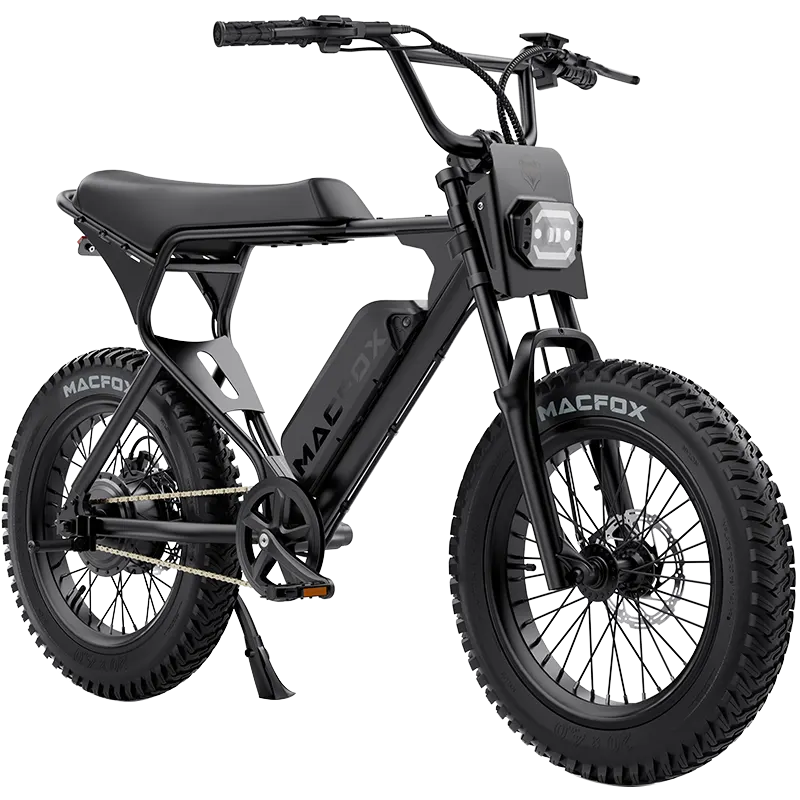
If you need model details while checking parts or documentation, use the Macfox X1S e-bike product page as the X1S reference point. Do not replace display, controller, throttle, brake lever, battery, or motor parts by guesswork if the code is still unclear.
Preventing Repeat Error Codes
- Keep connectors dry: avoid pressure washing around the display, controller, battery, axle, and plug areas.
- Watch cable strain: handlebar turns, wheel removal, storage, and transport can pull on display, brake, throttle, or motor wires.
- Charge before deep discharge: repeated low-voltage cutouts can shorten battery life and create confusing symptoms.
- Check after bumps or service: many communication codes appear after a connector has been disturbed.
- Do not bypass safety parts: brake cutoffs, throttle return, and controller protection are there for rider safety.
FAQ
What does Macfox X1S error 36 mean?
Error 36 is commonly treated as a motor phase or motor wiring issue. Stop hard riding, inspect the visible motor cable path and connectors with the bike powered off, and contact support if the code remains.
What should I do for E30 on a Macfox X1S?
E30 is a communication error. It may involve the display, controller, or wiring path. Start with the Macfox E30 guide and avoid replacing parts without confirming the failure point.
Can I ride if the X1S shows a low-voltage code?
Do not ride far on a low-voltage warning. Charge the battery fully, reseat it, and test gently. If the warning returns with a full battery, stop and check battery health or support options.
Are P01, P02, P08, and P10 error codes?
No. P settings are display parameters, not fault codes. They can affect units, backlight, wheel size, speed display, or other settings, but they should not be confused with E-series errors.
Why did resetting the display not fix the code?
A reset can clear a temporary display glitch, but it will not fix a loose connector, damaged wire, brake sensor problem, throttle issue, low-voltage battery, controller fault, or motor phase problem.
What if my display does not show a code?
If the display is blank or will not power on, troubleshoot display power and wiring first. If the display works but the bike has no assist, compare battery, brake cutoff, throttle, controller, and motor symptoms.








13 thoughts on “Macfox X1S E-Bike Error Codes: What They Mean and What to Check”
Mel Gonzalez
Im.getting a Small M in the Dash,
Tried Reseting it, and still nothing, Is there anything else. I can do.
J. Bailey
Support
My son’s Macfox ebike model EL-R20S, won’t run. (Error code E30 on the controller).
I want to try a reset but I don’t know what all the P0 codes mean. I’ve tried removing the battery but that didn’t help.
Can you provide me a list of all the setting P0 codes? Thank you in advance.
Ken
Seems like everytime I change my back tire and put everything back together my throttle goes bad and I get error code 006. This is the 3rd time I’ve had to change the throttle. There is no damage to the wiring what other reason would there be for this? It’s getting pretty old to be honest.
George Navarro
Hi I am getting a E30 code on my Mac fox all wiring and connections look good. Please advise.
Lucas Charpentier
I have an error E 30 on my new E-bike X1S
How can I fix it ?
I know how to go in the setting menu with the + and – button and code 6666 but I don’t know what I have to do after to fix it